Inside the P3D package
P3D is a packaged digital asset: captured appearance, media and machine-readable context stay together. The archive-style structure uses a manifest to describe the product and link its visual, textual and optional spatial layers. A consumer opens one asset and extracts the information needed for its task.
What is included
| Package component | Contents | Purpose |
|---|---|---|
| Manifest / index | Version, product identity, view ordering and payload references | Describe the asset and preserve relationships. |
| Images | High-definition views from the capture sequence | Supply appearance, inspection and image-based inputs. |
| Media | View sequences and video when included | Support motion, interactive and content workflows. |
| Metadata and text | Attributes, descriptions, specifications and extracted text | Retain factual meaning alongside the visual evidence. |
| Semantic data | Tags, masks and segmentation when generated and included | Support object-aware editing, retrieval and annotation. |
| Optional spatial data | Sparse points, depth cues, camera-angle and scale information | Provide a foundation for later spatial processing. |
A concrete package example
The supplied image-stack export contains manifest.json and 360 PNG files under images/. Richer exports add the applicable media and spatial payloads. A package’s manifest is the guide to its actual content.
Use cases: one asset, multiple possibilities
Cataloging, PDP and DPP
Keep captured appearance with product data for listings, interactive presentation and passport workflows.
Art and digital archives
Record appearance, inscriptions, collection metadata and condition views in a common asset.
Visual evidence and examination
Associate captured views with provenance and case context. Evidentiary use requires chain-of-custody controls and validated handling.
Digital training and GenAI
Extract image, text and metadata inputs from a shared object-level record.
Immersive experiences and gaming
Use view-based objects, inventory displays, inspection interfaces and appropriate background assets.
Design and virtual production
Reuse product references, image plates and view-based elements in design and screen-based virtual production.
These uses share a common requirement: preserve appearance and meaning together. Free navigation, relighting, physics and geometric interaction are separate rendering or modeling requirements; a view-based asset supplies captured viewpoints and can feed a richer reconstruction workflow when required.
File compression and AI-ready delivery
The product family offers four size profiles: Ultra 200 MB, High 80 MB, Medium 40 MB and Lite 4 MB. They provide a 50-fold range in delivered file size, allowing a rich source asset and compact distribution copies to serve different deployment needs.
| Profile | Nominal size | Reduction versus Ultra | 10,000 assets¹ |
|---|---|---|---|
| Ultra | 200 MB | Reference | 2,000 GB |
| High | 80 MB | 60% | 800 GB |
| Medium | 40 MB | 80% | 400 GB |
| Lite | 4 MB | 98% | 40 GB |
Where the efficiency comes from
Image-led assets avoid making dense geometry part of every distribution copy. Resolution, frame count, encoding and included data layers determine the payload. The media is already encoded before archive packaging, so most of the space saving comes from the representation and profile choices rather than repeatedly ZIP-compressing an image.
¹ Decimal units. Storage totals equal nominal file size × 10,000 and exclude replicas, backups and indexes. Lower-resolution profiles do not imply unchanged pixel detail or identical spatial payloads. The reported 4K capability belongs to high-definition capture and appropriate exports, not automatically to every 4 MB file.
Why compact, structured assets help AI workflows
Compact deployment copies reduce the bytes moved and stored for those copies. The manifest keeps the product identity connected to extracted views and textual attributes. AI pipelines can ingest the relevant images and fields rather than first generating and rendering a dense model for an image-based task.
Move the selected representation
Use a compact delivery profile where its detail is sufficient for the consuming task.
Keep image and meaning aligned
Extract the product views with the same identity, text and attributes instead of joining disconnected records.
Avoid compulsory reconstruction
Image-based training and GenAI can start with captured views and associated context.
Choose the right source
Retain high-detail masters for small text, finish inspection or tasks that need greater visual detail.
Turnaround time and output options
The automated scanning workflow captures a product with repeatable viewpoints and a controlled sequence. Capture runs from as low as 1 minute to about 7 minutes for a detailed scan, with an average of approximately 6 minutes. Processing takes 7 minutes. These timings replace the earlier 10-minute processing figure.
| Capture workflow | Capture | Processing | Sequential source-asset TAT |
|---|---|---|---|
| Fastest capture | 1 min | 7 min | 8 min |
| Average capture | 6 min | 7 min | 13 min |
| Detailed capture | 7 min | 7 min | 14 min |
A shorter capture cycle
Against the 10–20-minute conventional capture reference used by the product team, the 6-minute average is 40–70% shorter, or 1.67–3.33× the capture throughput before processing and handling. This comparison describes that capture reference; it is not a universal timing claim for every scanning system.
Why the processing path is shorter
P3D’s core delivery asset is an indexed image and media representation. Preparing it does not require a complete dense point cloud, watertight mesh, retopology or baked texture atlas. The processing effort is directed toward usable visual frames, indexing, associated information and packaging. Optional depth and sparse spatial data enrich the asset without making dense reconstruction mandatory.
| Output option | Reusable source | Delivery route |
|---|---|---|
| Catalog images | Selected product views | Image selection, crop, edit and export. |
| Video / spin content | Ordered view sequence | Sequence playback or media rendering. |
| Interactive PDP | Indexed images and product context | Compatible viewer and web integration. |
| GenAI creative | Reference views, masks and product attributes | Compatible generation or editing system. |
| Training record | Related views, text and labels | Dataset extraction and preprocessing. |
| Spatial processing | Optional points, depth and camera data | Compatible spatial tooling or reconstruction. |
Resolution, profiles and file types
P3D supports 4K high-definition capture for detailed appearance. The distribution profile selects an appropriate payload footprint. The reference export supplied for this paper contains 1080 × 608 PNG frames, and its resolution metadata records 1080; the embedded pixels establish the actual resolution of that sample.
| Technical dimension | P3D treatment |
|---|---|
| Capture resolution | 4K capture capability for high-definition appearance. |
| Embedded view resolution | Determined by the export; supplied sample: 1080 × 608. |
| Deployment profiles | Ultra 200 MB; High 80 MB; Medium 40 MB; Lite 4 MB nominal. |
| Container file type | .p3d archive-style package. |
| Image payload example | PNG views are present in the supplied package. |
| Structured payload example | JSON manifest is present in the supplied package. |
| Media and spatial types | Export-dependent video, masks, depth or point data require a consumer that understands the included representation. |
Container versus extracted outputs
The P3D file is the source package. A consuming tool may extract images, transcode sequences to a video, build a dataset record or pass optional spatial information to another application. JPEG/WebP previews, rendered video and reconstructed 3D derivatives are downstream outputs; their availability depends on the exporter or application, not solely on the .p3d extension.
Inside a P3D: a high-size product example
The supplied Iced Black Tea asset, IGO_2026_0675_017_P3D_001.p3d, is the comparison source for this edition. It contains 360 PNG views, one manifest and a 54.44 MB archive. This is a high-size sample selected by the product owner, not a typical-size guarantee or a nominal Lite export.
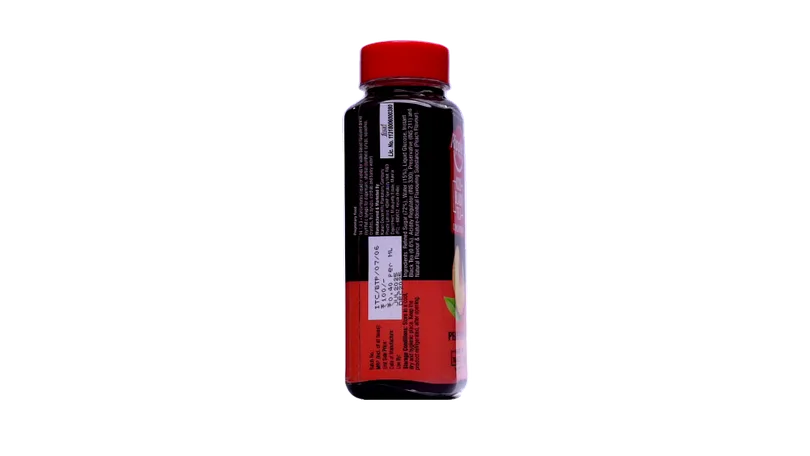 Drag to change the captured view
| Observed property | Measured sample value |
|---|---|
| Format declaration | Perfit P3D Image Stack · version 3.2-rich |
| Package inventory | 360 PNG images + manifest.json · 361 archive entries |
| Embedded pixels | 1080 × 608 per PNG view |
| Original archive | 54,436,585 bytes · 54.44 MB (decimal) |
| View grid | 36 horizontal × 10 vertical indices |
| Structured information | Product ID, seller ID, category, product name, view indexing and processing metadata; many optional attribute fields are unfilled |
| Manifest | 14,088 bytes raw; 2,212 bytes stored in the archive |
| Editorial web preview | 360 WebP views · 810 × 456 pixels · 4,164,696 bytes combined |
| Preview size change | 92.35% fewer encoded bytes than the complete original archive; resolution and encoding are changed |
A low-cost information layer
The manifest occupies 2,212 stored bytes—approximately 0.0041% of the original archive. The PNG entries use ZIP STORE with no additional archive compression. The measured preview reduction comes from resizing and WebP encoding, rather than simply putting the same PNGs into a different container.
What this export demonstrates
The file demonstrates indexed appearance and product-context packaging. No explicit XYZ point-cloud file, depth-map file or calibrated camera-pose payload is present in its archive inventory. Optional sparse 3D and camera-context layers described elsewhere are format/workflow capabilities, not evidence that this particular export contains those layers. The original source archive is retained byte-for-byte for the full buyer viewer.
Source SHA-256: 45ec5006808656d66b151f14a76deb6051186da50b57412414fd39ffbd73747d. Dimensions were read from every PNG; archive entry counts and compression sizes were read directly from the ZIP directory. Preview encoding: WebP quality 82, resized to 810 × 456 pixels.
From visual files to digital training records
P3D’s contribution to digital training is the association of evidence: what an object looks like, what it is, what is written on it and how its views relate. A dataset pipeline can extract imagery and structured fields from one object-level record instead of reconciling independently named files and spreadsheets.
| Training task | P3D contribution | Resulting data workflow |
|---|---|---|
| Visual recognition | Related views of a known product or object | Learn appearance variation while retaining identity. |
| Image–text retrieval | Images associated with names, descriptions and specifications | Build aligned image–text records and searchable asset libraries. |
| Product understanding | Visible text plus non-visual supplier attributes | Connect recognition to attributes that cannot be inferred reliably from appearance alone. |
| Segmentation and object editing | Masks, tags or segmentation included by the processing workflow | Reuse object boundaries and annotations in compatible training systems. |
| Spatial learning | Optional camera, depth and sparse point information | Build view-conditioned and spatially informed datasets when those fields are present. |
| Inspection models | Reference views linked to object identity and capture context | Organize comparison and defect-training data with explicit labels. |
Why the architecture changes dataset production
The reusable unit becomes an object with its evidence, rather than a single anonymous image. Additional tasks start from the same captured record: extraction, indexing, annotation and augmentation can preserve the product identity throughout. This reduces repeated source-data assembly and makes provenance easier to carry into downstream datasets.
Multiple views remain observations of the same object. Dataset splits must preserve object identity to avoid training/test leakage. Model accuracy, convergence time and the number of training examples required are properties of a specific experiment, not automatic consequences of the container.
One source for GenAI and content production
P3D turns a scan into a reusable content source. High-definition product views preserve real details; metadata and text provide factual context; optional masks and spatial fields provide additional conditioning. Marketing and creative teams can start successive outputs from the same asset instead of arranging a new shoot for each format.
Catalog and campaign images
Select captured views, create crops and compose backgrounds using a consistent product reference.
Sequences and video
Reuse ordered imagery for spins and motion outputs; use captured views as references for generated clips.
Condition with the actual product
Supply views, attributes and product text to compatible GenAI tools for controlled editing and scene composition.
Screens and virtual assets
Prepare view-based elements, image plates and background assets for virtual production screens and immersive compositions.
Capture once; distribute the work
The production gain is the reuse of captured evidence, not a claim that every generated result is automatically correct. Product identity, geometry, branding and visible text still require output review. Photographed reference views improve the input supplied to a generation system; they do not by themselves guarantee a physically accurate generated scene.
Compute the representation the task needs
For product presentation and image-based AI, a dense 3D reconstruction is often an intermediate expense rather than the required output. P3D preserves the captured surface appearance and associated context in 2.5D. It moves dense geometric work off the critical path for tasks that consume images, sequences and product information.
No compulsory dense model
Prepare the captured representation without requiring a complete mesh or a trained radiance-field representation for the core asset.
Work directly with imagery
Use image and video tooling for appearance correction, background treatment, frame selection and content extraction.
Decode the views needed
Interactive playback can work from indexed images. Memory use depends on decoded resolution and cache policy, not file size alone.
4K appearance and spatial detail are different properties
4K capture preserves fine visual details such as print, finish, color boundaries, texture appearance and visible surface relief. In an image-led asset, this appearance is already photographed rather than recreated by material authoring. A 4K image is not itself a 4K depth map or a measured topographic model. Metric size, depth precision and surface accuracy depend on the optional spatial layer, camera calibration and capture geometry.
Sparse spatial data gives selected geometric anchors while keeping the mandatory asset lightweight. Full model training, reconstruction or complex inference still has its own compute requirements; the efficiency benefit is avoiding that work for every basic viewing or content task.
A product digital twin with visual and factual context
For catalog and product-information workflows, P3D serves as the visual and contextual digital counterpart of a physical item. It links the product’s appearance to identity, descriptions, specifications and capture information. Optional sparse geometry adds a spatial layer for future enrichment.
| Deployment | What the P3D contributes | Application layer |
|---|---|---|
| Cataloging | Consistent product views, identity and attributes | Listing preparation, product-information management and search. |
| PDP — Product Detail Page | Inspectable viewpoints and supporting product information | Interactive browsing, zoom and product presentation within the available view envelope. |
| DPP — Digital Product Passport | Product identity, visual evidence and associated attributes | Verified lifecycle, material, repair and traceability records complete the passport workflow. |
| Inspection | Reference appearance and capture context | Human review or task-specific automated comparison. |
| Digital twin enrichment | Appearance, metadata and optional sparse geometry | Attach subsequent measurements, events, annotations and external system records. |
| Immersive experience | High-definition view-based representation | Object exploration and scene composition within the supported viewer or engine. |
A catalog digital twin is an appearance-and-information record. Engineering simulation, live operational synchronization and certified measurement need additional validated models, measurements or system connections.
Keep a lightweight spatial foundation
P3D supports an optional sparse point-cloud layer and associated camera-angle information. This retains selected information about shape, scale, surface structure and depth for later spatial processing. The core 2.5D viewing workflow stays usable without reconstructing every surface into a dense 3D model.
| Spatial field | Technical role | Interpretation |
|---|---|---|
| Sparse points | Selected 3D surface or feature locations | Partial geometric support; not a complete measured surface. |
| Camera information | Angles, view relationships and calibration when included | Supports view association; full reconstruction benefits from intrinsics and poses. |
| Depth | Relative or metric distances according to capture/estimation method | Units, reference frame and estimation confidence define its meaning. |
| Scale and size | Link a representation to physical dimensions | Metric use needs a calibrated scale or trusted measurements. |
| Topographic cues | Selected surface-shape information | Spatial precision is determined by acquisition and estimation, independently of image resolution. |
The lightweight benefit comes from carrying a selective spatial representation and invoking further processing only when needed. Rich images remain available for future algorithms while the asset avoids the mandatory storage and preparation of a complete dense model.
A capture architecture beyond the dedicated scanner
The automated scanner provides repeatable capture and reduces the amount of manual viewpoint planning required from an operator. A technician follows the capture workflow rather than building a 3D model, repairing topology or authoring materials. Product placement, lighting and visual quality checks remain practical operator responsibilities.
The image-based architecture also extends to sources such as mobile phones, conventional cameras, video cameras and extracted video feeds. A dedicated station emphasizes consistency and automation; field sources emphasize availability and coverage. They feed the same general pattern: prepare usable imagery, associate context and package a reusable record.
| Source | Capture role | Data to retain |
|---|---|---|
| Automated product scanner | Repeatable product views and controlled capture | Product identity, view order and station/camera settings. |
| Mobile phone | Accessible object and field capture | Device/camera metadata, orientation and available location information. |
| Conventional camera | High-detail still-image acquisition | Lens settings, exposure, calibration and capture sequence. |
| Video camera or feed | Extract views and temporal observations | Frame timestamps, sequence mapping and source provenance. |
| Specialized sensor imagery | Domain-specific acquisition and enrichment | Sensor model, calibration, coordinate system and data interpretation. |
The 1–7-minute scan range and 7-minute processing figure describe the product scanning workflow. Capture conditions, missing viewpoints and sensor-specific preparation determine the workflow for other sources.
Earth observation: a spatial intelligence extension
The P3D concept extends naturally from an object record to a geospatial observation package: imagery, sensor context, derived spatial information and related datasets travel as one interpretable unit. The opportunity is to preserve relationships among observations and analysis products while distributing only the data needed for a task.
Retain the sensor context
An Earth-observation extension would carry geolocation, timestamps, coordinate reference systems, sensor/lens model and calibration, viewing geometry, platform position and orientation, processing lineage, uncertainty and derived depth or sparse points. For optical imagery, lens and exposure fields describe acquisition. SAR requires radar-specific information such as wavelength, polarization, incidence angle and processing level; an optical lens description cannot substitute for it.
| Layer | Role in an observation package |
|---|---|
| RGB and optical imagery | Human-readable appearance and feature context. |
| Hyperspectral or multispectral data | Band information, wavelengths, radiometric values and calibration retained with the scientific payload. |
| SAR data | Radar measurements or derived products, with geometry, polarization and processing context. |
| Spatial derivatives | Depth products, sparse features or point clouds, with coordinates, scale and uncertainty. |
| Cross-sensor relationships | Registration transforms, acquisition times, resolutions and provenance linking related observations. |
| Delivery derivatives | Previews, selected regions or extracted features for prioritized distribution. |
Normalize and fuse without losing scientific meaning
RGB, hyperspectral and SAR sources observe different physical properties. A common package can associate them, but useful fusion requires co-registration, coordinate and timing alignment, sensor calibration and task-specific normalization. Native precision, spectral bands, units and complex SAR values must be retained where the analysis depends on them. A display image is a derivative, not a substitute for the scientific measurements.
Process near the sensor; downlink the useful result
An onboard pipeline can select regions, extract features or generate compact derived products before transmission. P3D’s proposed role is the delivery envelope that preserves their metadata and relationships. Downlink savings come from the processing and selection policy; packaging alone does not shrink every scientific dataset to 4 MB. Satellite deployment requires suitable flight hardware, software validation, power and thermal budgeting, and a policy for retaining or retrieving the original measurements.
Build on existing geospatial standards
GeoTIFF already embeds georeferencing metadata, Cloud Optimized GeoTIFF supports efficient partial web access, and STAC structures searchable metadata across geospatial assets. P3D’s opportunity is complementary: bind related media, context and optional spatial derivatives into an application-facing package while preserving standard scientific assets and identifiers.4, 5, 6
Viewing options and deployment
| Viewing or access mode | Experience | Technical requirement |
|---|---|---|
| Browser product viewer | Drag or select captured viewpoints; zoom/pan where supported | Decode indexed images and interpret the manifest. |
| Embedded PDP experience | Interactive product presentation inside a product page | Viewer integration and a delivery profile suited to the page. |
| Image and media extraction | Selected stills, sequences or rendered video | Compatible extractor or exporter; preserve product identity. |
| Application / desktop workflow | Inspect the asset or use it within a production tool | P3D reader or conversion to the tool’s supported payload format. |
| AI/data ingestion | Images, text and metadata enter a dataset or generation system | Manifest parsing, preprocessing and task-specific input mapping. |
| Immersive / gaming integration | View-based objects or backgrounds inside an engine | Engine-specific rendering or a reconstructed derivative for full geometric interaction. |
Interaction follows the captured view envelope. Horizontal and vertical view coverage determines available angles; frame interpolation is a viewer/processing capability, not a substitute for observing missing surfaces. The supplied comparison sample has 36 horizontal indices and 10 vertical indices. Its preview supports selection across the full 360-view grid; these are indexed views, not a claim of calibrated camera poses.
Separate portable data from the rendering layer
P3D stores the representation and relationships. A viewer decides how to decode, cache and present those views; an AI pipeline decides how to extract and transform them. This lets the same source asset support different applications without requiring every consumer to render a full 3D model.
Choose the representation around the task
| Representation | Core strength | P3D’s differentiated role |
|---|---|---|
| Single image / conventional video | Direct visual communication and broad playback support | Adds an object-level package with indexed views, text, metadata and optional spatial context. |
| Photogrammetry | Reconstruct geometry through alignment, depth/point-cloud and model-building stages | Delivers an image-led source asset without requiring the complete dense reconstruction path for core viewing and content reuse. |
| Gaussian splatting | Optimize a scene representation for novel-view rendering | Uses captured appearance directly for the core asset; no per-scene splat training is required for that image-led delivery. |
| glTF / GLB | Efficient runtime delivery of mesh-based scenes, materials and animation | Prioritizes captured views and associated product/context data; geometric engines can consume reconstructed derivatives. |
| GeoTIFF / COG + STAC | Standardized scientific/geospatial rasters, efficient access and catalog metadata | Proposed complementary package for multimodal relationships, previews and spatial derivatives. |
Photogrammetry and Gaussian splatting solve reconstruction and rendering problems that differ from direct captured-view delivery. Their processing time depends on images, scene complexity, hardware and quality targets. Modern methods such as InstantSplat demonstrate reconstruction in seconds, so a universal “P3D is fastest” or “10× faster than all splatting” claim is not technically supported.1, 2, 3
glTF is itself designed for efficient 3D delivery; it is not inherently a heavy format. P3D and mesh-based formats carry different representations. File-size comparisons must account for image resolution, viewpoint coverage, included metadata and geometric functionality.7
Closing: capture once, build digital intelligence
P3D’s efficiency comes from choosing an image-led representation for the many tasks that need appearance and context, then retaining optional spatial information for tasks that need more. The product is captured once, its evidence stays connected to its identity, and downstream workflows extract the information they use.
For commerce, the same record supplies catalog and interactive product content. For AI, it organizes visual and textual inputs around an object. For inspection, archives and immersive media, it preserves an inspectable source. The proposed Earth-observation extension applies that packaging principle to related sensor data and spatial derivatives.
Evidence, calculations and references
This edition presents HyperD / Perfit / Is Going Online product specifications and architecture as supplied by the product owner on 21 October 2026: 1–7-minute capture range, approximately 6-minute average capture, 7-minute processing, 4K capture capability, four nominal MB profiles, metadata/text/media packaging and optional sparse spatial data. It is a technical product white paper, not an independent certification or a controlled cross-vendor benchmark.
Arithmetic in the graphics: average sequential source TAT = 6 + 7 = 13 minutes; detailed TAT = 7 + 7 = 14 minutes; Lite size reduction = (200 − 4) / 200 = 98%; Ultra-to-Lite size ratio = 200 / 4 = 50:1. Capture comparison = (reference − 6) / reference for the owner’s 10–20-minute reference. No measured AI accuracy gain, GPU-energy saving, sales uplift or universal end-to-end content speedup is claimed.
The satellite section describes a proposed extension and its technical requirements. The comparison source IGO_2026_0675_017_P3D_001.p3d was inspected directly and remains unchanged. It is a 54,436,585-byte high-size example with 360 PNGs at 1080 × 608 and a 14,088-byte manifest (2,212 bytes stored). The 4,164,696-byte web preview is a resized, lossy derivative, not an official size profile or equal-quality benchmark. Product-size profiles are nominal values, not maximum-size guarantees. Pixel resolution, geometry accuracy and scientific measurement fidelity are separate properties.
Per-scene optimization and image-based reconstruction workflow.
Sparse-view reconstruction and reported optimization in seconds.
Photogrammetry stages: alignment, point clouds, model and texture generation.
Georeferenced raster metadata.
Tiled imagery, overviews and partial web access.
Structured and searchable metadata for geospatial assets.
Efficient transmission and loading of runtime 3D assets.